

Microsoft Fabric Implementation
This article will guide you through the most important aspects of Microsoft Fabric implementation
1. Introduction to Microsoft Fabric
2. Who Should Implement Microsoft Fabric?
3. Key Benefits of Microsoft Fabric
4. Microsoft Fabric Components Explained
5. Understanding the Medallion Architecture in Microsoft Fabric
6. Microsoft Fabric Licensing, Pricing & Cost Considerations
7. Best Practices for a Successful Microsoft Fabric Implementation
1. Introduction to Microsoft Fabric
Microsoft Fabric is a comprehensive, AI-powered data platform designed to unify data storage, management, analytics, and business intelligence (BI) across various sources. As part of Microsoft’s suite of cloud-based data solutions, it helps organizations streamline data integration, enhance analysis capabilities, and improve decision-making.
Why Microsoft Fabric?

2. Who Should Implement Microsoft Fabric?
With its integrated architecture, Microsoft Fabric enables businesses to unlock the full potential of their data – whether for real-time analytics, AI-driven insights, or enterprise reporting.
3. Key Benefits of Microsoft Fabric
Microsoft Fabric offers a unified, collaborative, and scalable data platform that simplifies data management, analytics, and cost optimization. Instead of relying on multiple, disconnected analytics services, organizations can leverage a streamlined, all-in-one solution that is easy to onboard, integrate, and operate.
Top Benefits of Microsoft Fabric :
By adopting Microsoft Fabric, businesses gain a centralized, AI-powered, and cost-effective data solution that enhances collaboration, security, and analytics capabilities—all within a governed, scalable, and high-performance environment.
4. Microsoft Fabric Components Explained
Data Factory – Streamlined Data Integration
A cloud-based data integration service offering:
Co-Pilot – AI-Powered Assistance & Automation
A context-aware AI toolset that enhances productivity by:
OneLake – Unified Cloud Data Storage
A centralized data lake built on Azure Data Lake Storage Gen2, offering:
Power BI – Interactive Data Visualization & Analytics
A leading BI tool within Microsoft Fabric, enabling:
Data Engineering – Large-Scale Data Transformation
A powerful workspace that allows:
Data Science – AI & Machine Learning Capabilities
A fully integrated ML envoirement, offering:
Data Warehouse – High-Performance Analytical Storage
A fully managed, scalable data warehouse, featuring:
Real-Time Inteligence – High-Speed Streaming Analytics
A real-time data processing solution, enabling:
Microsoft Pureview – Data Governance & Compliance
A robust data management and compliance solution, ensuring:
Additional Features of Microsoft Fabric
Apache Spark – Scalable Data Processing Engine
A high-performance framework for:
Data Pipelines – Automated Data Flow Management
A scalable data integration framework, allowing:
Data Lakehouse – Hybrid Storage & Analytics Solution
A powerful hybrid solution combining Data Lakes & Data Warehouses, featuring:
To learn more about the practical application of these tools, check out the webinar below, featuring a discussion of a real-life case study!
5. Understanding the Medallion Architecture in Microsoft Fabric
The Medallion Architecture is a structured data design pattern that improves data quality, structure, and usability as it moves through multiple incremental processing layers. This approach ensures that data adheres to ACID properties (Atomicity, Consistency, Isolation, Durability) before it reaches its final storage and analytical layers, making it reliable, scalable, and optimized for analytics.
This architecture is divided into three logical layers based on data quality and refinement:
1. Bronze Layer – Raw data
2. Silver Layer – Cleansed, standardized data
3. Gold Layer – Optimized and Enriched Data for Analytics
By following this structured Lakehouse model, businesses can maximize data usability, improve governance, and streamline analytics workflows within Microsoft Fabric.
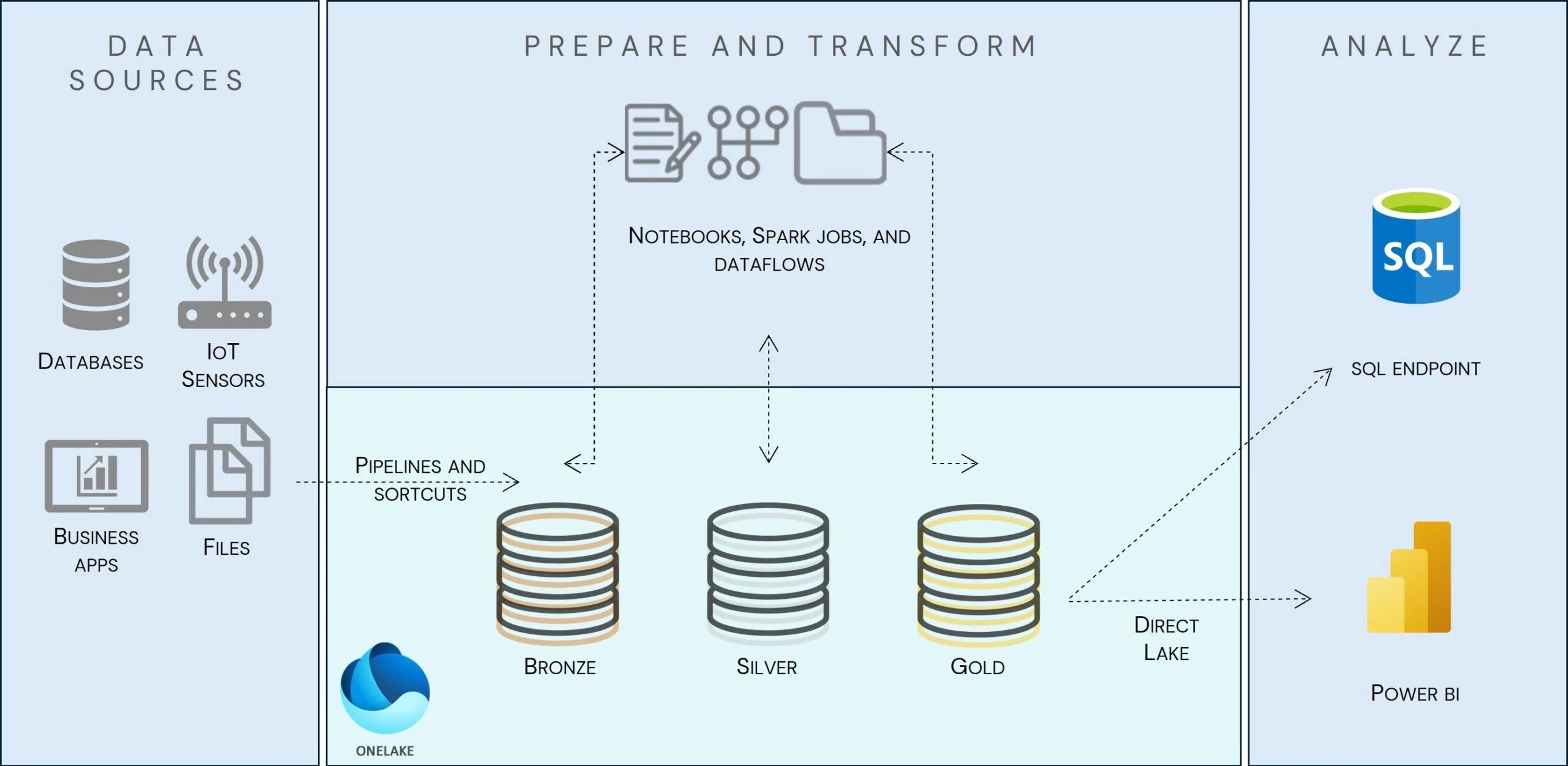
Layers’ description
1. Bronze Layer – Raw Data Ingestion & Storage
Purpose:
A landing zone for raw, unprocessed data
Data Sources:
Data Factory, Data Pipelines, and shortcuts are used for ingestion
Sources include databases, APIs, IoT devices, external files, and third-party platforms
Key Features:
Use Case:
Storing raw logs from an IoT device before processing
2. Silver Layer – Cleansed & Standardized Data
Purpose:
Improves data quality, consistency, and integration
Processing Tools:
Spark Jobs, Spark Notebooks, and Fabric Dataflows for transformation
Key Features:
Use Case:
Cleaning sales transaction data from different stores and merging it into a structured dataset
3. Gold Layer – Business-Ready, Optimized Data
Purpose:
Provides refined, structured, and aggregated data for analytics
Processing Tools:
Data Engineering workloads for aggregation, indexing, and optimization
Key Features:
Use Case:
Generating revenue trend analysis by aggregating sales data by region
6. Microsoft Fabric Licensing, Pricing & Cost Considerations
Microsoft Fabric offers flexible pricing plans designed to accommodate businesses of all sizes, from startups to large enterprises. Its pay-as-you-go model ensures that organizations only pay for the resources they use, making it a cost-effective and scalable data solution.
Microsoft Fabric Pricing Model
Microsoft Fabric follows a Capacity-Based Licensing Model, meaning you purchase compute capacity rather than individual services. Pricing is based on:
Example: If your organization requires heavy data processing for real-time analytics, you may need a higher CU tier to support performance.
Factors Affecting Microsoft Fabric Cost:
Microsoft Fabric Licensing Options
Microsoft Fabric is available as part of Power BI Premium, meaning that existing Power BI users can leverage Fabric without needing a separate license.
How to Optimize Microsoft Fabric Costs?
Why Microsoft Fabric is Cost-Effective?
Need help selecting the right Microsoft Fabric plan?
Contact Us for Expert Guidance
Book a consultation call and we will get back to you.
7. Best Practices for a Successful Microsoft Fabric Implementation
Implementing Microsoft Fabric requires a strategic approach to ensure a smooth deployment, seamless data integration, and optimal performance. By assembling a cross-functional implementation team and following best practices, organizations can maximize the value of their data platform while minimizing risks and inefficiencies.
1. Assemble a Cross-Functional Implementation Team
A successful Microsoft Fabric implementation requires collaboration between IT, business stakeholders, and an experienced delivery partner.
IT Team: Responsible for technical setup, integration, security, and performance optimization.
Business Team: Defines use cases, reporting needs, and data governance policies to ensure alignment with business objectives.
Delivery Partner (Antdata): Provides expertise in architecture, deployment, and customization, ensuring a smooth and efficient implementation.
Why Work with a Microsoft Partner Like Antdata?
2. Define Clear Business Objectives & Use Cases
Before implementing Microsoft Fabric, identify key business goals and how the platform will support them.
Example:
Goal: Improve real-time analytics for customer behavior insights
Use Case: Use Real-Time Intelligence in Microsoft Fabric to process live data on Manufacturing lines efficiency (OEE).
3. Develop a Scalable Data Strategy
Microsoft Fabric is designed for scalability, so it’s essential to:
4. Ensure Security, Compliance & Governance
With enterprise-grade security and compliance tools, organizations should:
5. Optimize Costs with Smart Resource Allocation
To control costs and maximize efficiency, consider:
6. Enable Self-Service Analytics & AI-Powered Insights
To empower teams across the organization:
7. Partner with Experts for a Smooth Deployment
Working with a certified Microsoft Partner like Antdata ensures:
Get in touch with us
Book a consultation call and we will get back to you.
Select a date for a consultation phone call.