

Microsoft Fabric
Your Business Intelligence Partner
Unified analytics platform built on Microsoft’s trusted cloud foundation
Join data from all your systems in one place with OneLake – secure, open, and scalable
From ingestion to insight– one integrated environment for your entire data journey
Empower your team with AI-ready chats and real-time business intelligence
Analytical platform delivered by Microsoft. Fabric is about integrating many data processing tools within one environment. Classic implementation involves provisioning a couple of services (Azure SQL, Storage Account, Databricks, and so on), and each needs to be installed in the predefined infrastructure of a customer. Because of the technical complexity, needed permissions and access, the process is time consuming and may require Data Engineers with variety of qualifications. Fabric eliminates the forementioned drawbacks, offering all necessary solutions integrated within one platform.
Data is stored in OneLake, a unified and secure data lake designed for the entire organization. It removes data fragmentation by centralizing structured and unstructured data in one place. Open formats like Delta Lake ensure flexibility, scalability, and efficient data management.
Data engineering and analytics are powered by an integrated range of tools for ingestion, transformation, and orchestration. Real-time and batch processing capabilities work together to deliver clean, reliable data for insights. The platform streamlines workflows across services, ensuring consistency and performance.
Interactive dashboards and reports turn complex data into clear, actionable insights. Built-in integration with Power BI keeps visuals connected to live, trusted data. Users at all levels can explore, share, and make decisions with confidence.
Microsoft Fabric brings together a unified suite of analytics capabilities designed to cover every stage of the data lifecycle.
Its components work seamlessly across a single, integrated platform, enabling teams to ingest, engineer, store, analyze, visualize, and govern data with unmatched consistency.
From data pipelines and real-time processing to advanced data science and business intelligence, each component plays a crucial role in delivering end-to-end insights.
Unified storage through OneLake and enterprise-grade governance with Microsoft Purview ensure that data is secure, discoverable, and easy to manage across the organization.
With AI-powered assistance from Copilot and deep industry partnerships, Fabric empowers businesses to accelerate analytics and unlock value faster than ever


Dataflows Gen2
It provides a modern, low-code experience for ingesting and transforming data directly into OneLake. It supports reusable data preparation logic across workspaces, improving consistency and governance. A key element of Microsoft Fabric implementation, it enables business users and data engineers to collaborate seamlessly.

Shortcut
Shortcuts in Fabric create virtual links to data stored in other locations without copying it, enabling instant access across workspaces and clouds. They allow teams to unify data from ADLS, AWS S3, or other Fabric items in OneLake while keeping it in its original place. This reduces storage duplication, simplifies governance, and enables cross-domain collaboration.

Lakehouse
Combines the scalability of a data lake with the performance of a warehouse, all within OneLake. It allows teams to manage structured, semi-structured, and unstructured data in a single environment. Ideal for Azure data architects, it enables unified analytics without data movement or duplication.

Eventstream
Real-time data ingestion and processing capabilities directly into the Fabric environment. It connects streaming sources, enabling continuous data capture and instant analytics on live events. This component enhances Azure data platform architecture by adding real-time intelligence to Fabric’s unified model.

Data Activator
Automates actions and alerts based on real-time data changes within Fabric. It seamlessly connects to Eventstream and Power BI, enabling instant responses to key business events. This no-code automation tool exemplifies the intelligent, event-driven nature of Microsoft Fabric implementation

Pipelines
Pipelines in Microsoft Fabric allow you to orchestrate and automate data movement and transformation workflows. They connect to multiple data sources, execute activities in sequence or in parallel, and manage scheduling, monitoring, and retries. With a low-code and code-first interface, pipelines make it easy to build scalable ETL processes across the Fabric ecosystem.

Notebooks
Interactive environment for data transformation, exploration, and advanced analytics using Spark, Python, or SQL. Fully integrated with Lakehouse and OneLake, they allow users to run data engineering and AI tasks without switching tools. This makes them a powerful asset in modern Microsoft Fabric implementations.

Real-Time Dashboard
A Real-Time Dashboard provides continuously updating insights based on live streaming data. It visualizes events, metrics, and signals as they occur, enabling rapid decision-making and real-time monitoring. In Fabric, real-time dashboards integrate seamlessly with event streams and KQL databases to deliver up-to-the-second analytics.
Implementing Microsoft Fabric involves creating a unified, scalable foundation for
data management and analytics within your organization.
Step 1
Assess the current Azure data architecture and identify key data sources, business goals, and governance requirements.
Step 2
Design the target Fabric environment, including workspaces, data storage in OneLake, and access controls.
Step 3
Ingest and transform data using Data Factory, Dataflows Gen2, or Notebooks, ensuring consistency and quality.
Step 4
Build analytical models and Power BI reports to visualize insights and drive informed decisions.
Step 5
Automate actions and monitoring with Data Activator, optimizing real-time responsiveness.
This structured approach ensures a smooth and secure Microsoft Fabric implementation,
data management and analytics within your organization.
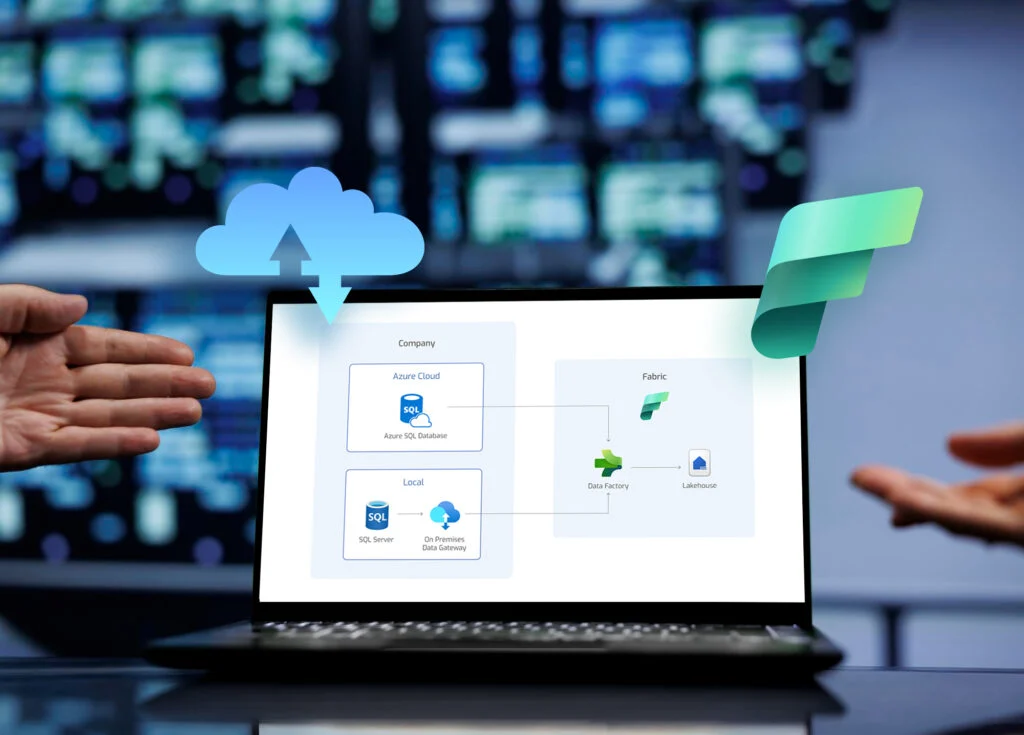
Microsoft Fabric in a Hybrid Data Environment
Read more
Microsoft Fabric Implementation This article will guide you through the most important aspects of Microsoft Fabric implementation 1. Introduction to Microsoft…
Read more